How to Recover User ID and Password in GST Portal
If you are having trouble logging in to your account on the GST portal, there is no need to worry! Now, retrieve your user ID and password by simply following these steps:
Recover User ID
Forgot your GST portal username? Follow these steps
Open this link https://www.gst.gov.in/ in your browser.
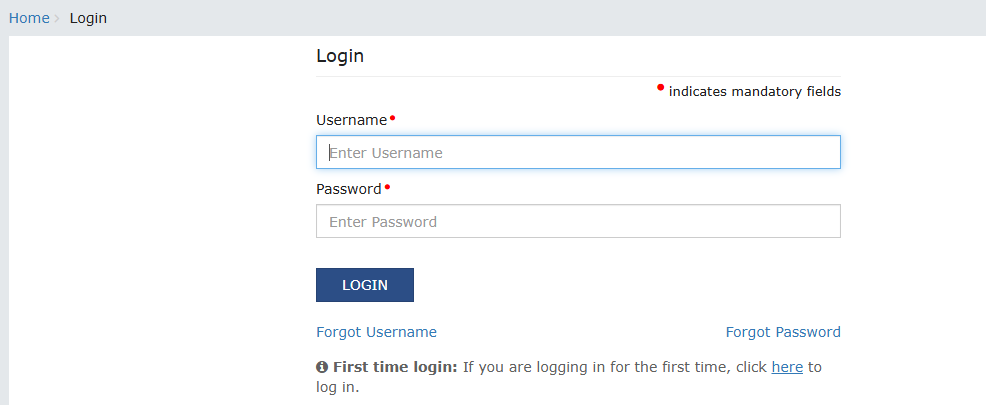
On the login page, click on the " Forgot User ID."
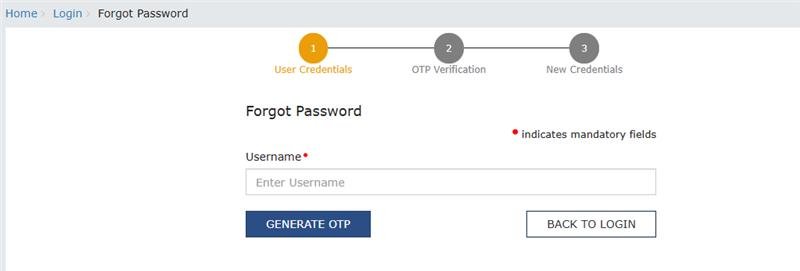
Enter your GST Number and registered email address.
Click on ‘’Send OTP on your registered email address.
Enter the OTP and click on the “Submit” button.
Create a new password and confirm it.
Click on “Submit” to update your password.
Recover Password
Reset your GST portal password in a few easy steps
Open the link https://www.gst.gov.in/ in your browser.
On the login page, click on the " Forgot Password" link.
Enter your user ID and GSTIN
Click on Send OPT to receive an OTP on your registered mobile number.
Enter the OTP and click on “Submit”.
Create new password: Create a new password and confirm it.
Click on “Submit” to update your password.